Block Themes
Enabling the hidden dark theme
First, let's enable the hidden dark theme.
In scratch-gui, go to src/components/menu-bar/theme-menu.jsx. In that file, there is a ThemeMenu component, which has a variable called enabledThemes, find it and add DARK_THEME.
const ThemeMenu = ({
    isRtl,
    menuOpen,
    onChangeTheme,
    onRequestOpen,
    theme
}) => {
    const enabledThemes = [DEFAULT_THEME, HIGH_CONTRAST_THEME, DARK_THEME];
    const themeInfo = themeMap[theme];

    // ...
}
Make sure you import it too:
import {DARK_THEME, DEFAULT_THEME, HIGH_CONTRAST_THEME, themeMap} from '../../lib/themes';
If we want Scratch to remember the theme, we need to make Scratch consider it a valid theme. To do this we need to add it to isValidColorMode in src/lib/themes/themePersistence.js:
const isValidColorMode = colorMode => [DEFAULT_THEME, DARK_THEME, HIGH_CONTRAST_THEME].includes(colorMode);
Make sure you import it for this file too:
import {DEFAULT_THEME, DARK_THEME, HIGH_CONTRAST_THEME} from '.';
Creating our own theme
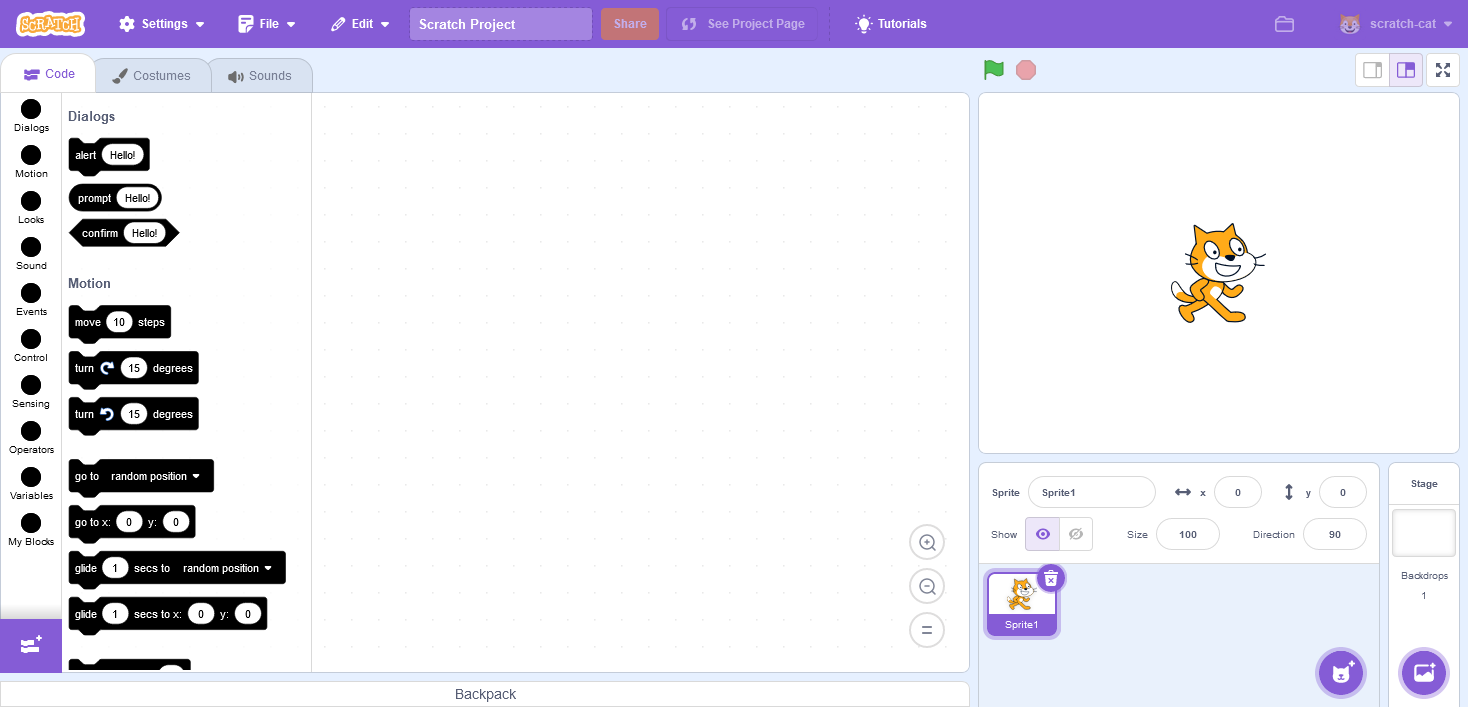
Let's create a theme that makes Scratch harder by making all the colours the same (well two colours, foreground and background).
Creating the theme
Copy and paste src/lib/themes/default/index.js to a new src/lib/themes/hard-mode/index.js and make some changes to it. I am going to make all the colours either black (foreground/text and blocks background) or white (background).
Registering the theme
In src/lib/themes/index.js, add these:
// ...

import {blockColors as defaultColors} from './default';
import {blockColors as hardModeBlockColors} from './hard-mode';

// ...

const DEFAULT_THEME = 'default';
const HIGH_CONTRAST_THEME = 'high-contrast';
const DARK_THEME = 'dark';
const HARD_MODE_THEME = 'hard-mode';

// ...

const messages = defineMessages({
    // ...
    [HARD_MODE_THEME]: {
        id: 'gui.theme.hardModeTheme',
        defaultMessage: 'Hard Mode',
        description: 'label for hard mode'
    }
});

const themeMap = {
    // ...
    [HARD_MODE_THEME]: {
        blocksMediaFolder: 'blocks-media/default',
        colors: mergeWithDefaults(hardModeBlockColors),
        extensions: {},
        label: messages[HARD_MODE_THEME]
    }
};

// ...

export {
    DEFAULT_THEME,
    DARK_THEME,
    HIGH_CONTRAST_THEME,
    HARD_MODE_THEME,
    defaultColors,
    getColorsForTheme,
    themeMap
};
Enabling the theme
This is the same process as the dark mode theme.
Spoiler: The amazing hard mode Scratch editor:
Completed Files
| Component | File | Download |
|---|---|---|
scratch-gui | src/lib/themes/index.js | index.js |
scratch-gui | src/components/menu-bar/theme-menu.jsx | theme-menu.jsx |
scratch-gui | src/lib/themes/hard-mode/index.js | index-hardmode.js |
scratch-gui | src/lib/themes/themePersistence.js | themePersistence.js |
Scratch commit hashes at the time of this tutorial
scratch-gui:        7a72429477eb0006e91efb87efe2736b610564bd
scratch-vm:         a63f3899bfbded7c9b1c9a7ce840bafb08957482
scratch-blocks:     774b27a983e13e307c6d42b77ededc84f2b40b9a